Windows 11: A Deep Dive into Innovations. Should You Upgrade to Windows 11?
Operating systems, which serve as the bridge between the user and their machine, are constantly evolving. Windows, which leads the pack among OS platforms, is preparing to release its latest version — Windows 11. Let’s take a look at what innovations this update will bring and whether it’s worth the anticipation.
Official Data and Expectations for Windows 11
Microsoft has yet to announce the exact release date of Windows 11, but it is expected that the new version will be available in October 2021. Pre-release testing is already in full swing, giving users the chance to experience the innovations.
System Requirements
The minimum requirements for Windows 11 are as follows:
- Processor: at least 1 GHz, 2 cores, 64-bit;
- RAM: at least 4 GB;
- Storage: 64 GB with 50 GB allocated for the system;
- Graphics: DirectX 12/WDDM 2.x;
- Display: at least 9 inches with a resolution of 1024×720.
Key Innovations in Windows 11
- TPM 2.0: The Trusted Platform Module provides enhanced security through data encryption. This technology is actively utilized in the latest processors and can be configured through UEFI or BIOS.
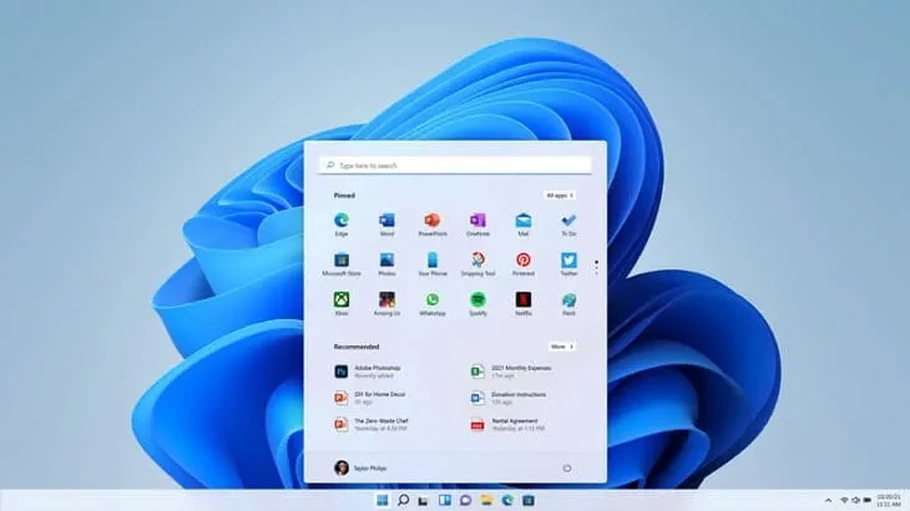
- Start Menu: The layout and visual style have been revamped. Live tiles have been replaced with a more structured and minimalist interface.
- Gaming Features: Windows 11 includes Auto HDR for better image quality and Direct Storage for faster game loading on SSDs.
- Widgets: Expanded options for personalizing content on your desktop.
- Microsoft Store: Updated interface and developer terms that allow the use of custom payment systems.
- Android Apps: Support for Android apps on PCs, extending the use of mobile software on your computer.
Advantages and Potential Challenges
Windows 11 promises improvements in usability and security. However, high system requirements and the discontinuation of Win32 app support may pose challenges for users with older hardware.
Conclusion: Should You Upgrade to Windows 11?
The upgrade offers many exciting features, but with Windows 10 supported until 2025, there’s no need to rush. Consider user reviews and potential updates following the official release to ensure the stability and optimization of the new system.